Showing posts with label Art. Show all posts

Sunday, 22 November 2009

Blogger Template : She's a Lady

She is a Lady, girly blogger template with unique static image at left side. Customized with lady and swirl vector. Suits your personal diary blog.


Installation Setting
  1. Click on download link. New window will appear, then click download
  2. Save xml file to your desktop. Remember, just save it no need to open
  3. Go to blogger dashboard
  4. Go to Layout>Edit HTML
  5. Click upload, choose downloaded xml file
  6. Save

-------------------------------------------------
THE CONTENTS OF THIS TEMPLATE IS MADE BY CEBONG IPIET.
PLEASE BE RESPECTFUL AND DO NOT REMOVE CREDIT FOOTER LINK WITHOUT MY PERMISSION.
YOU ARE ALLOWED TO DISTRIBUTE BUT NOT ALLOWED TO ADD ANY LINK ON FOOTER
read more...

Saturday, 8 August 2009

Blogger Template : Scrapbook Mania


Scrapbookmania is converted from wordpress to blogger. Original designer by Simplywp. This free template suits your scrapbooking hobby, girly diary.

How to Use?

  1. Click on download link
  2. You'll redirect to download pop up window
  3. Click download and save it to your desktop
  4. Now, open blogger dashboard
  5. Go to Edit HTML
  6. Click upload button, select xml file
  7. Save


-------------------------------------------------
THE CONTENTS OF THIS TEMPLATE IS MADE BY RESPECTIVE OWNER
PLEASE BE RESPECTFUL AND DO NOT REMOVE CREDIT FOOTER LINK WITHOUT MY PERMISSION.
YOU ARE ALLOWED TO DISTRIBUTE BUT NOT ALLOWED TO ADD ANY LINK ON FOOTER
read more...

Tuesday, 31 March 2009

Blogger Template : Reflection

Introducing, my new blogger template design, Reflection Blogger Template. Suitable for your artwork, artfolio, design portfolio blogs. Dominated black,white, and blue color, plus slide featured for showing your great artwork.
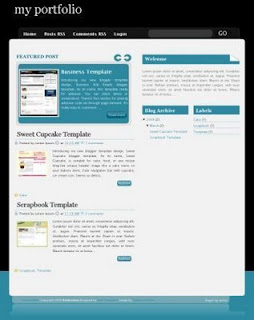
You can check preview and download this template

Installation Settings

Javascript Setting

Upload all javascript and image (I've attached on download folder) to your own hosting. This step to avoid bandwidth exceeded. Open Edit HTML, find javascript and image background code, edit and use your own link. Read this for your guide , How to Upload Javascript and image?

Javascript included

Automatic readmore script, JQuery Script, Glide Script

Navigation Menu Setting

Open Edit HTML, edit these code below

<div id='NavbarMenuleft'><ul id='nav'>
<li><a expr:href='data:blog.homepageUrl'>Home</a></li>
<li><a href='#'>Post RSS</a></li>
<li><a href='#'>Comments RSS</a></li>
<li><a href='#'>Login</a></li>
</ul>
</div>

To add more link, add this code

<li><a href='http://YOUR-LINK.com'>YOUR-TEXT-MENU</a></li>

Glide Setting (Slide Show)

Open Page Element , click Edit on Glide Content Widget, and put this code below. You can put as many as you want, but it's suggested up to 6 image slide. If you want put two slide, just copy this code twice, want to put three slide copy it three times.

<div class="glidecontent">
<div class="glidim">
<a href="" title=""> <img width="150" alt="" src="https://blogger.googleusercontent.com/img/b/R29vZ2xl/AVvXsEjHfE7Rt9ooeizBa8fBc9LiG9WQHVNzImaXgj_ESXgcYhPkTCCzo05cBChRjozWIbGdrlWgdX4HMv_dmPIvQCvEaxypR0pJ8HU_vHgBD6WPXMXInvNffN5UdtKSPm3Ow2QzGNp_NUfIhcE/s1600/screenshoot.jpg" height="180"/> </a>
</div>
<div class="glidmeta">

<h2><a href="http://www.ipietoon.com/2009/01/blogger-template-baby-blue.html" title="Baby Blue">Baby Blue Template</a></h2>
Just like its name, this template is so cute. Suitable for your lovely baby blog. With pink and blue color, soft and smooth. Download it now.

<div class="gmore">
<a href="http://www.ipietoon.com/2009/01/blogger-template-baby-blue.html" target="_blank">Read more</a>
</div>
</div>
</div>

Replace red colored text with your own image URL

Replace blue colored text with your own post URL

Replace green colored text with your ownpost title

Replace yellow colored text with your ownpost (post summary)

I also offer paid footer link. Buying footer link is a cheaper and easier way than paid link to spread your link. What's the advantage? With reasonable price, you get unlimited link. Wanna buy footer link? Contact me at cebong.ipit@gmail.com

ATTENTION
THE CONTENTS OF THIS TEMPLATE IS MADE BY CEBONG IPIET.
PLEASE BE RESPECTFUL AND DO NOT REMOVE CREDIT FOOTER LINK WITHOUT MY PERMISSION.
YOU ARE ALLOWED TO DISTRIBUTE BUT NOT ALLOWED TO ADD ANY LINK ON FOOTER
read more...

Thursday, 5 March 2009

Blogger Template : Green Scrapbook Diary

Do you love scrapbooking? Looking for scrapbook template for your blog? I guess this is your right template. Green Scrapbook Diary wordpress theme is designed by Kathie and Andrew from Simply WP . I just convert it to blogger and make a lil bit customization. Kathie & Andrew have spent many time to make it free, keep intact their credit footer.

No complicated setting. To edit navigation bar menu, go to page element, edit link list at top bar.

[PREVIEW] | [DOWNLOAD]

read more...

Sunday, 1 February 2009

Blogger Template : Black Brown Art

Here's another modification of dark brown template. Three column with art header. No special setting, upload it and voila hope it's work ^_^. Special for Seamos Realistas, thanks for your suggestion. Here for you.


[PREVIEW] | [DOWNLOAD]


UPDATED March 23 2009
read more...

Wednesday, 21 January 2009

Blogger Template : My Scrapblog

This is my first trial making my own scrapping using online scrapping site, scrapblog. This blog is so easy to use. More than a thousand theme, graphic, picture you can combine become a beautiful scrapping. The difficulties are making the right size for my template, infact that's not easy to adjust it T_T. Thanks God I can finish it and the result is here


Download XML file without image [HERE]
read more...

Friday, 9 January 2009

Blogger Template : Torn Paper


This template is converted from wordpress theme. I love simple layout so I convert this theme to blogger template. Very easy to customize. No need to upload anything.

General Information :
  • Converted from Wordpress theme (see the credit footer)
  • 3 column
  • Personal blog
  • Photo author and numbering comment
read more...